
Screenshots

App details
- Updated
- Jan 19, 2011
- Language
- English
- Category
- Mobile
SoftPas in:
This product is also available in the following languages:
About Youtube Music Player
Download Youtube Music Player – youtube music player, firefox extension, music playlist, seamless music access, browser-based music player, youtube music, music streaming
Overview
The YouTube Music Player is a Firefox extension designed to enhance the music listening experience directly within the browser. By integrating YouTube’s vast video library into a dedicated music player interface, it allows users to access and enjoy music without leaving their browsing environment. This tool is particularly useful for individuals who rely on Firefox as their primary browser and want a streamlined way to play music from YouTube videos. The extension serves as a bridge between YouTube’s content-rich platform and the need for a focused, user-friendly music playback experience.
It addresses common challenges such as tab overload, slow video loading, and the need for third-party applications to manage music playlists. With the ability to create and manage playlists through simple drag-and-drop actions, users can curate their favorite tracks efficiently. The extension is ideal for music enthusiasts, casual listeners, and content creators who need quick access to audio from YouTube videos. Although the developer did not provide additional technical details, the app’s long-standing presence since its release on January 19, 2011, suggests a stable and functional design.
Within the broader ecosystem of browser-based tools, YouTube Music Player fills a niche by offering a lightweight, free solution for music streaming. Its integration with Firefox ensures minimal performance overhead while delivering core music player functionality. Real-world use cases include background listening during work, playlist creation for events, and on-the-go access to music without installing a separate app. For users seeking a no-frills, browser-native music experience, this extension remains a relevant and practical option.
Key Features & Functionality
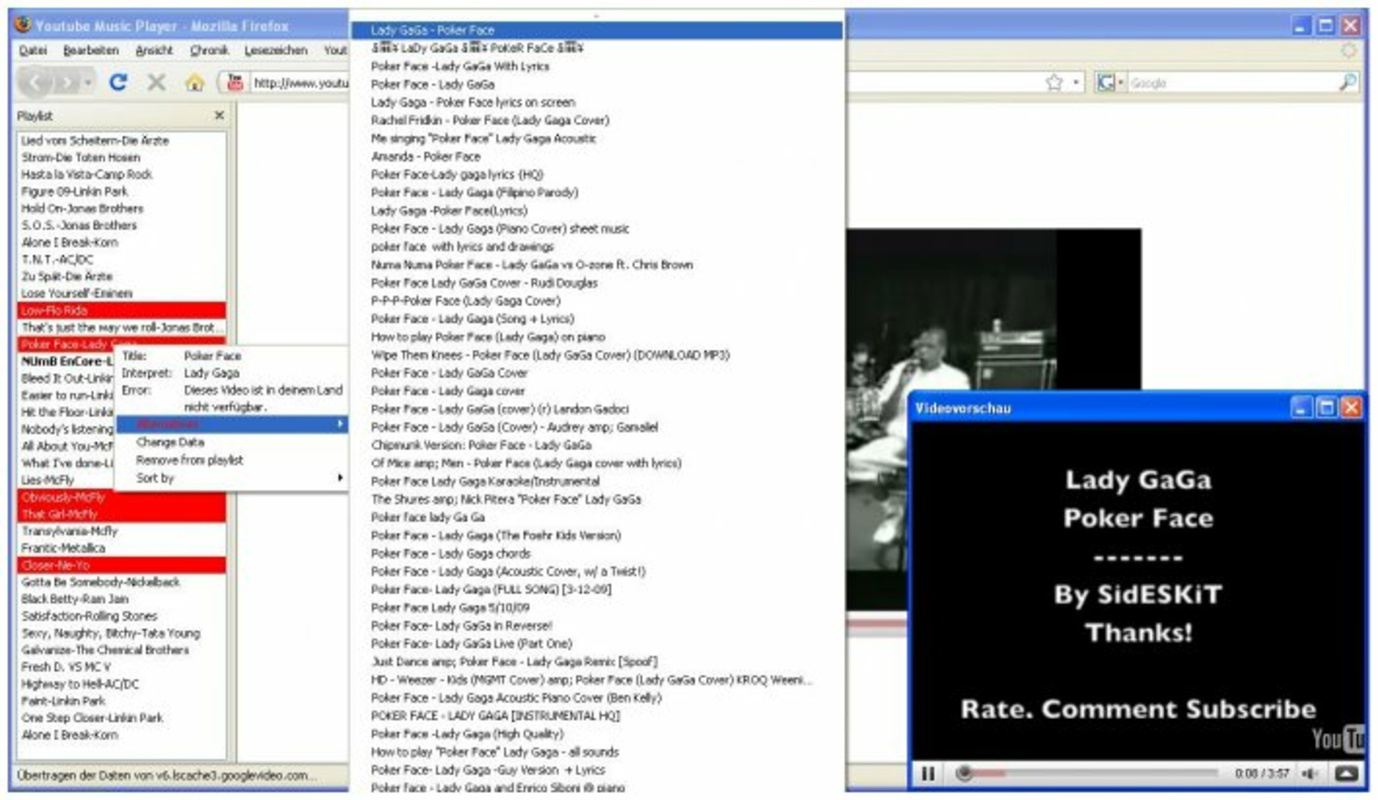
- Easy Video Addition: Users can add YouTube videos to their playlists by dragging and dropping video links directly into the extension. This intuitive method eliminates the need for manual copying or complex workflows, making playlist creation fast and accessible to all users.
- Instant Loading: Selected videos are preloaded as soon as they are added, enabling near-instant playback. This feature reduces wait times and enhances the overall listening experience, particularly when switching between tracks.
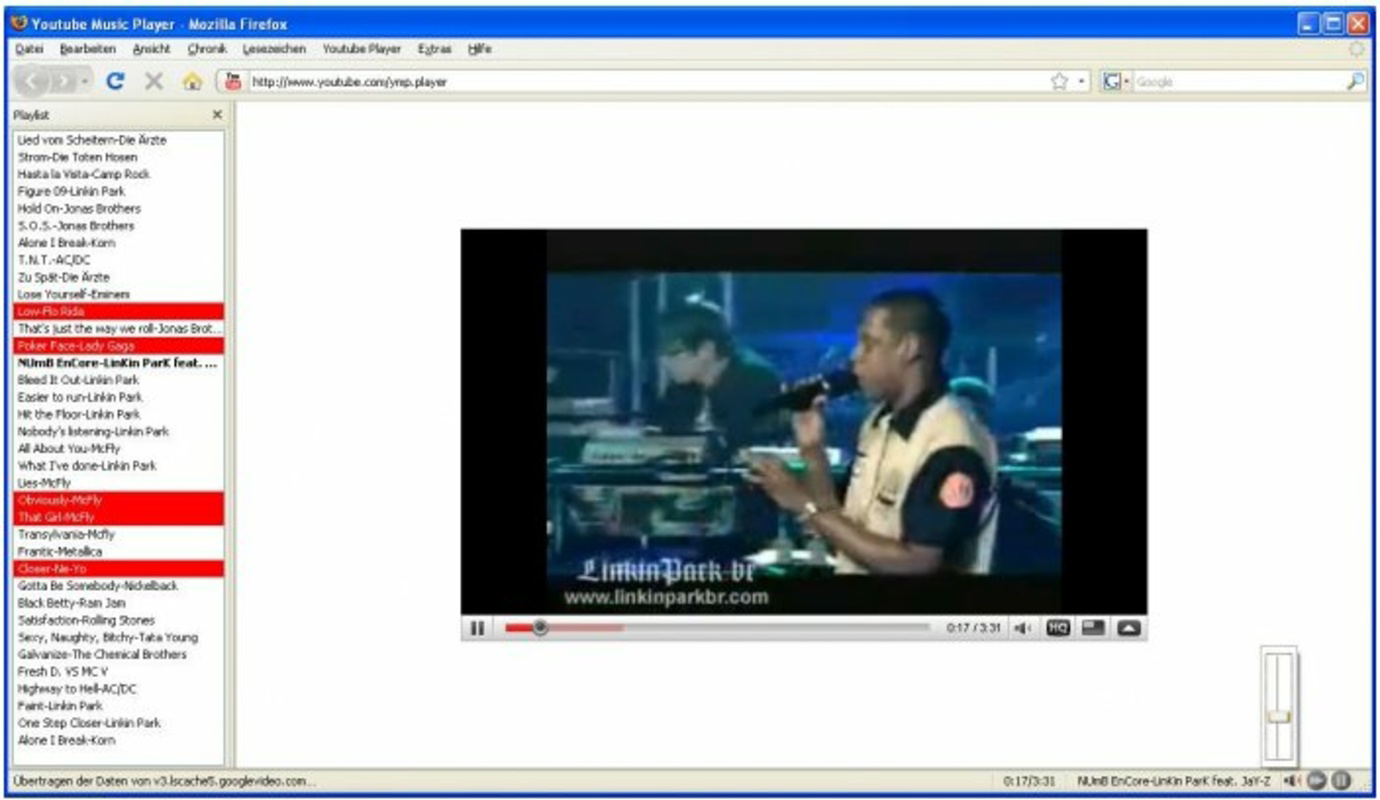
- Music Player Controls: The extension includes standard playback controls such as play, pause, shuffle, and repeat. These tools provide a familiar interface for users accustomed to traditional music apps, ensuring a seamless transition from mobile or desktop music platforms.
- Unlimited Music Access: By leveraging YouTube’s extensive video database, the extension grants access to a virtually endless library of songs and music videos. This allows users to discover new artists, revisit classic tracks, and explore niche genres without restrictions.
- Firefox Integration: Fully embedded within the Firefox browser, the extension operates without requiring external applications. This integration ensures a smooth, consistent experience across sessions and reduces system resource usage.
For example, a user preparing for a party can quickly compile a playlist by dragging links from YouTube videos into the extension. Once added, tracks load instantly, allowing for uninterrupted playback. Similarly, a student studying can use the shuffle feature to maintain a dynamic background music environment. The extension’s simplicity and direct functionality make it a reliable tool for everyday music consumption.
Interface, UX & Performance
The interface of YouTube Music Player is designed with minimalism and usability in mind. It presents a clean, compact player window that integrates seamlessly into the Firefox browser’s UI. The layout focuses on essential controls, with clearly labeled buttons for play, pause, shuffle, and repeat. Navigation is intuitive, with playlist management handled through a straightforward list view that displays added videos in chronological order.
Users can expect a responsive experience across various device categories, although specific performance metrics were not disclosed by the developer. The extension’s lightweight size of 456KB suggests it operates efficiently without consuming significant system resources. Although the developer did not list formal performance metrics, the extension’s long-standing availability indicates consistent stability over time.
Responsiveness is maintained through direct browser integration, allowing for smooth transitions between playback states and playlist updates. The extension does not appear to require frequent updates, which may reflect its mature and stable codebase. However, users should ensure their Firefox browser is up to date to maintain compatibility and security. Overall, the user experience prioritizes functionality and ease of use, making it accessible even to non-technical users.
Platform Compatibility & Technical Requirements
YouTube Music Player is designed exclusively for the Firefox browser. It is compatible with the latest versions of Firefox, though specific minimum OS requirements were not listed by the developer. The extension has a file size of 456KB, indicating a lightweight footprint that should not impact device performance significantly.
Users should ensure their Firefox browser is updated to the most recent version to avoid compatibility issues. The extension does not require additional software or permissions beyond standard browser access. Since it is not available on mobile platforms, it is intended for desktop use only. The developer did not provide information about support for alternative browsers or operating systems.
Pros and Cons
- Free to download and use with no hidden costs
- Lightweight size (456KB) ensures minimal system impact
- Seamless integration with Firefox browser
- Instant loading of added videos for uninterrupted playback
- Simple drag-and-drop playlist creation
- Not available on mobile devices or other browsers
- No official update frequency or changelog provided
- Dependent on YouTube’s availability and stability
- Basic interface may lack advanced customization options
- Compatibility with older Firefox versions not confirmed
FAQ
Is YouTube Music Player available for Android or iOS?
YouTube Music Player is designed exclusively for the Firefox browser and is not available on mobile platforms such as Android or iOS.
Can I use this extension without a Firefox account?
Yes, the extension does not require a Firefox account to function. It operates independently within the browser environment.
Is the extension safe to install?
As a browser extension published through the official Firefox Add-ons platform, YouTube Music Player is subject to Mozilla’s security review. It is considered secure for installation, provided it is downloaded from the official source.
Does the extension support offline playback?
There is no indication that YouTube Music Player supports offline playback. All content is streamed directly from YouTube.
How often is the extension updated?
The developer did not specify an update schedule. Users are advised to check the Firefox Add-ons page periodically for updates.
Final Thoughts
YouTube Music Player remains a practical and efficient tool for Firefox users seeking a streamlined way to enjoy music from YouTube. Its lightweight design, instant loading, and intuitive playlist management make it a solid choice for casual listeners and dedicated music fans alike. While it lacks mobile support and advanced features, its core functionality is well-executed and reliable.
For individuals who value simplicity, browser integration, and immediate access to a vast music library, this extension delivers consistent value. It stands out in the productivity category by offering a focused, no-frills solution that enhances daily browsing with music. Despite its age, the extension continues to serve its purpose effectively.
Download YouTube Music Player now
Guides & Tutorials
How to install Youtube Music Player
- Click the Download button above.
- Once redirected, accept the terms and click Install.
- Wait for the Youtube Music Player download to finish on your device.
How to use Youtube Music Player
This software is primarily used for its core features described above. Open the app after installation to explore its capabilities.
User Reviews
No reviews yet. Be the first to share your experience.
You may also like
more
Que no te pillen¡
About !Que no te pillen¡Reviewed by Jason A. BilbreyShow MoreShow Less

3D Combat Zone
About 3D Combat ZoneOriginally released in 1983, 3D Combat Zone immerses players...

666: El día del portal
About 666: El día del portalOn June 6, 2006, Agent P. Stone uncovers a sinister...

80 in 1 Best Flash games
About 80 in 1 Best Flash games 80 in 1 Best Flash games is a collection of 80 fl...

ABYSS SEEKERーーWhat Do You See Deep in The Abyss
About ABYSS SEEKERーーWhat Do You See Deep in The AbyssIn ABYSS SEEKER, players...

ACA NEOGEO THE KING OF FIGHTERS 2002 for Windows
About ACA NEOGEO THE KING OF FIGHTERS 2002 for WindowsTHE KING OF FIGHTERS 2002,...